Corel Draw macros _ curve all text
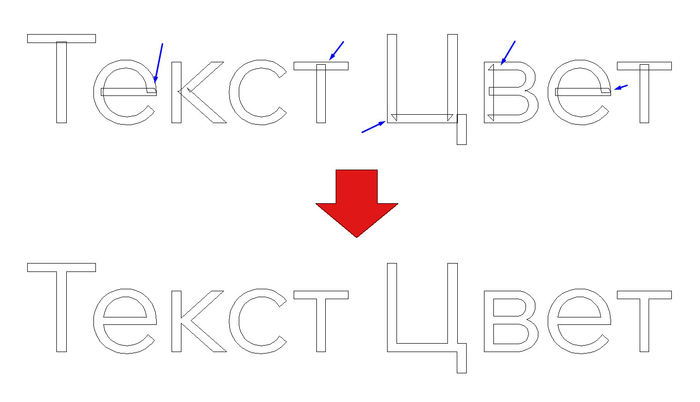
Скрипт (макрос) кривит текст в документе, также убирает пересечение контуров на Google шрифтах (или других подобных). Заметил проблемму в таких шрифтах пересечение контура. Макрос велдит объект после кривления шрифта, что позволяет избавляться от артефактов.
Option Explicit
Sub Alltext_to_curve()
Dim i As Long
Dim j As Long
Dim s As Shape
Dim textList As New Collection
Dim processed As Long
On Error GoTo ErrorHandler
ActiveDocument.BeginCommandGroup "All Text to Curves + Weld"
' ==========================================
' 1. Собираем текст со всех обычных страниц
' ==========================================
For i = 1 To ActiveDocument.Pages.Count
CollectTextRecursive ActiveDocument.Pages(i).Shapes, textList
Next i
' ==========================================
' 2. Собираем текст мастер-страницы
' ==========================================
CollectTextRecursive ActiveDocument.MasterPage.Shapes, textList
' ==========================================
' 3. Обрабатываем собранный текст
' ==========================================
For j = 1 To textList.Count
Set s = textList(j)
ConvertAndWeldText s, processed
Next j
ActiveDocument.ClearSelection
ActiveDocument.EndCommandGroup
MsgBox "Готово!" & vbCrLf & _
"Обработано объектов: " & processed, _
vbInformation, "Alltext_to_curve"
Exit Sub
ErrorHandler:
Dim errorText As String
errorText = Err.Description
On Error Resume Next
ActiveDocument.ClearSelection
ActiveDocument.EndCommandGroup
On Error GoTo 0
MsgBox "Ошибка: " & errorText & vbCrLf & _
"Обработано объектов: " & processed, _
vbExclamation, "Alltext_to_curve"
End Sub
' ==================================================
' Рекурсивный поиск текста внутри групп и PowerClip
' ==================================================
Private Sub CollectTextRecursive( _
ByVal shapes As Shapes, _
ByRef textList As Collection)
Dim s As Shape
Dim pwc As PowerClip
On Error GoTo ExitHere
For Each s In shapes
' Если это текст — добавляем в список
If s.Type = cdrTextShape Then
textList.Add s
Else
' Если это группа — обходим её содержимое
If s.Type = cdrGroupShape Then
CollectTextRecursive s.Shapes, textList
End If
' Если это PowerClip — обходим его содержимое
Set pwc = Nothing
On Error Resume Next
Set pwc = s.PowerClip
On Error GoTo ExitHere
If Not pwc Is Nothing Then
CollectTextRecursive pwc.Shapes, textList
End If
End If
Next s
ExitHere:
End Sub
' ==================================================
' Преобразование текста в кривые и Weld
' ==================================================
Private Sub ConvertAndWeldText( _
ByVal txt As Shape, _
ByRef processed As Long)
Dim sr As ShapeRange
Dim groupShape As Shape
Dim child As Shape
Dim children As ShapeRange
Dim i As Long
' Преобразуем исходный текст в кривые
txt.CreateSelection
ActiveSelectionRange.ConvertToCurves
Set sr = ActiveSelectionRange
If sr.Count = 0 Then Exit Sub
' ==========================================
' Результат — одна группа
' ==========================================
If sr.Count = 1 Then
Set groupShape = sr(1)
If groupShape.Type = cdrGroupShape Then
Set children = groupShape.Shapes.All
For i = 1 To children.Count
Set child = children(i)
If child.Type <> cdrGroupShape Then
' Проверенный способ: выделяем ребёнка
' и вызываем Weld через выделение
child.CreateSelection
If ActiveSelectionRange.Count > 0 Then
ActiveSelectionRange(1).Weld _
ActiveSelectionRange(1), False, False
processed = processed + 1
End If
End If
Next i
Else
' Одиночный объект
groupShape.CreateSelection
If ActiveSelectionRange.Count > 0 Then
ActiveSelectionRange(1).Weld _
ActiveSelectionRange(1), False, False
processed = processed + 1
End If
End If
Else
' ==========================================
' Несколько объектов в выделении
' ==========================================
For i = 1 To sr.Count
Set child = sr(i)
If child.Type <> cdrGroupShape Then
child.CreateSelection
If ActiveSelectionRange.Count > 0 Then
ActiveSelectionRange(1).Weld _
ActiveSelectionRange(1), False, False
processed = processed + 1
End If
End If
Next i
End If
End Sub