

1

Проблема при выключении MacBook

Всем здравствуйте.
Проблема с MacBook Air 13 (2018).
Не ронял, ничего не проливал, не ложил ничего тяжелого.
Столкнулся с проблемой в августе этого года. Именно при выключении компьютера. На этапе выключения все происходит как обычно, затем на время появляется цифровой шум (бывает разных цветов).

Поддержка Apple, ничего вразумительного ответить не смогла. Сказали только следить и писать им.

Для информации, было сделано совместно с сотрудниками техподдержки:
- вход в систему в безопасном режиме (проблема сохранена)
- полностью систему удалили и создали учетную запись гость (проблема сохранена)
- восстановили из копии систему (проблема сохранена)
- делали диагностику систему, ошибок не выявлено

Затем проблема неожиданно пропала. В конце октября снова появилась (несколько раз), на данный момент тьфу тьмы, но проблемы нет.
p.s. Не знаю надо это или нет сказать, но заметил в феврале 2022 года, и иногда сейчас. При присмотре онлайн фильмов/сериалов, мерцание экрана (только на сервисах нетфликс и эпл тв).
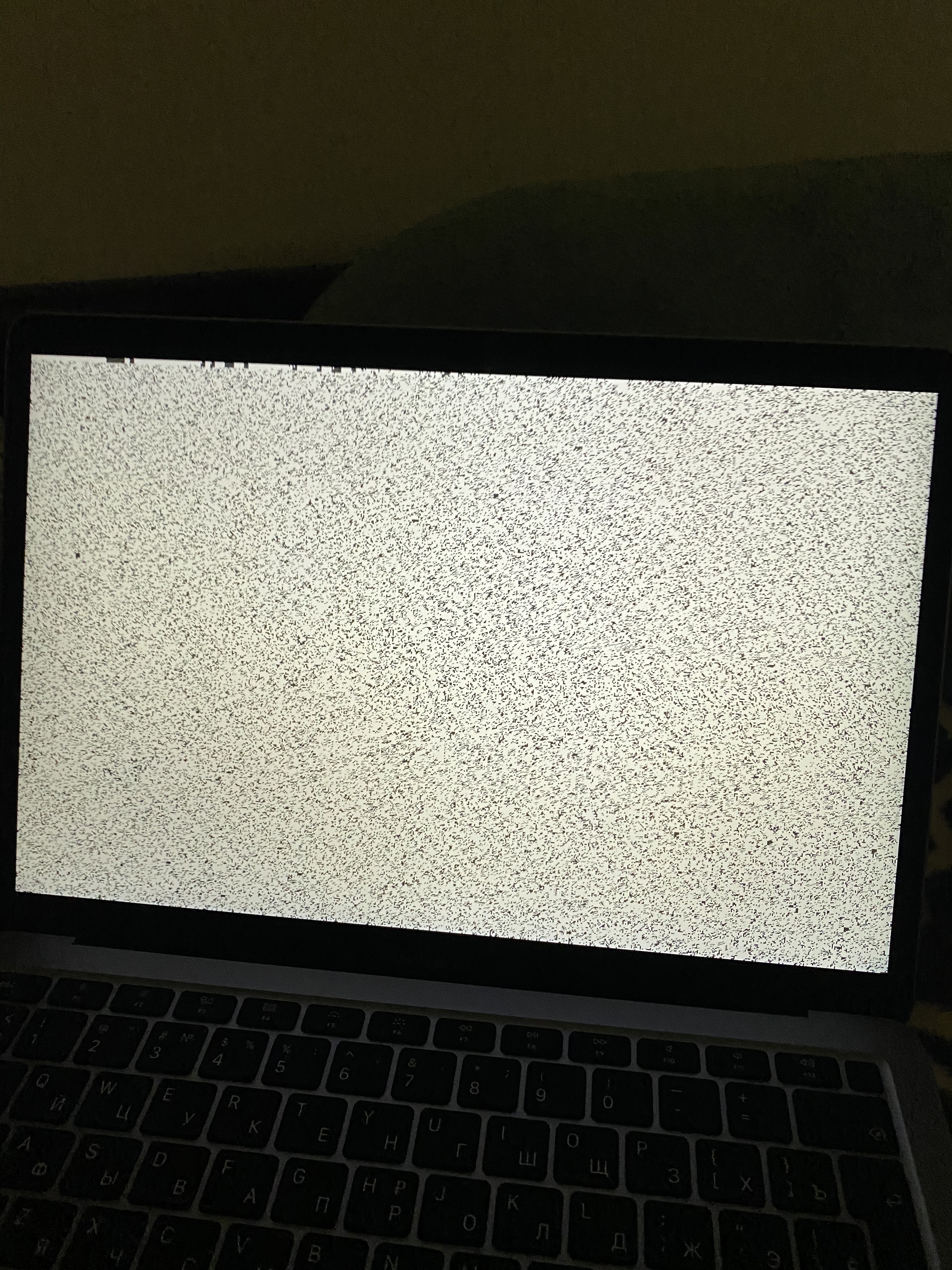
Проблема при выключении MacBook

Всё об iOS

448 постов3.4K подписчиков

Правила сообщества

Нельзя нарушать правила Пикабу.

Нельзя размещать посты не по теме.

Нельзя оскорблять участников сообщества.

Нельзя говорить, что iOS не ровня Android.

0
Мейн Кун Бонифаций
Автор поста оценил этот комментарий
Несколько вопросов:
1. Проблема сохраняется если мак выключается с подключенным шнуром питания и без него (на батарее)
2. Проблема сохраняется при подключенном внешнем мониторе ( если таковой есть)
3. Если все таки есть внешний монитор и экран мака закрыт, такие же помехи на внешнем мониторе?

Железячную диагностику прогоняли?
Я подразумеваю что процессор интел:

Выключаем мак
Включаем, удерживаем клавишу D до появления полосы или выбора языка
После окончания диагностики смотрим код, если есть:
Code Definition More information
ADP000 No issues found No issues found.
ALS001 There may be an issue with the ambient light sensor. Contact Apple or take your computer to an AASP or Apple Store to learn which service and support options are available.
BMT001
BMT003
BMT004
BMT005 There may be an issue with the Touch ID sensor. Contact Apple or take your computer to an AASP or Apple Store to learn which service and support options are available.
CNT001
CNT002
CNT003
CNT004
CNT005
CNT006
CNT007 There may be an issue with the Ethernet hardware. Contact Apple or take your computer to an AASP or Apple Store to learn which service and support options are available.
CNW001
CNW003
CNW004
CNW005
CNW006 There may be an issue with the Wi-Fi hardware.
Contact Apple or take your computer to an AASP or Apple Store to learn which service and support options are available.
CNW007
CNW008 No Wi-Fi networks are detected: No Wi-Fi networks are in range, or there may be an issue with the Wi-Fi hardware. Run the test again in range of a Wi-Fi network.

If this code appears again, further troubleshooting may be required. Contact Apple or take your computer to an AASP or Apple Store to learn which service and support options are available.
DFR001 There may be an issue with the Touch Bar. Contact Apple or take your computer to an AASP or Apple Store to learn which service and support options are available.
NDC001
NDC003
NDC004
NDC005
NDC006 There may be an issue with the camera.
Contact Apple or take your computer to an AASP or Apple Store to learn which service and support options are available.
NDD001
There may be an issue with the USB hardware. Disconnect all external devices except keyboard, mouse, and Ethernet adapter (if applicable). Run the test again.

If this code appears again, further troubleshooting may be required. Contact Apple or take your computer to an AASP or Apple Store to learn which service and support options are available.
NDK001
NDK003
NDK004 There may be an issue with the keyboard.
Contact Apple or take your computer to an AASP or Apple Store to learn which service and support options are available.
NDL001
There may be an issue with the Bluetooth hardware.
Contact Apple or take your computer to an AASP or Apple Store to learn which service and support options are available.
NDR001
NDR003
NDR004
NDR005
NDR006 There may be an issue with the trackpad.
Contact Apple or take your computer to an AASP or Apple Store to learn which service and support options are available.
NDT001
NDT002
NDT003
NDT004
NDT005
NDT006 There may be an issue with the Thunderbolt hardware. Disconnect external Thunderbolt devices and run the test again.

If this code appears again, further troubleshooting may be required. Contact Apple or take your computer to an AASP or Apple Store to learn which service and support options are available.
NNN001
A serial number was not detected.
Contact Apple or take your computer to an AASP or Apple Store to learn which service and support options are available.
PFM001
PFM002
PFM003
PFM004
PFM005
PFM006
PFM007 There may be an issue with the System Management Controller (SMC).
Contact Apple or take your computer to an AASP or Apple Store to learn which service and support options are available.
PFR001
There may be an issue with the computer's firmware.
Contact Apple or take your computer to an AASP or Apple Store to learn which service and support options are available.
PPF001
PPF003
PPF004 There may be an issue with the fan.
Contact Apple or take your computer to an AASP or Apple Store to learn which service and support options are available.
PPM001
There may be an issue with a memory module.
Contact Apple or take your computer to an AASP or Apple Store to learn which service and support options are available.
PPM002
PPM003
PPM004
PPM005
PPM006
PPM007
PPM008
PPM009
PPM010
PPM011
PPM012
PPM013
PPM014
PPM015
PPM016 There may be an issue with the onboard memory.
Contact Apple or take your computer to an AASP or Apple Store to learn which service and support options are available.
PPN001
PPN002 There may be an issue with the power-management system. Contact Apple or take your computer to an AASP or Apple Store to learn which service and support options are available.
PPP001
PPP002
PPP003
PPP004
PPP005
PPP006
PPP007
PPP008 There may be an issue with the power adapter. Make sure that you're using the correct power adapter, disconnect the power adapter from the computer and wall outlet, then reconnect. Run the test again.

If this code appears again, further troubleshooting may be required. Contact Apple or take your computer to an AASP or Apple Store to learn which service and support options are available.
PPR001
There may be an issue with the processor.
Contact Apple or take your computer to an AASP or Apple Store to learn which service and support options are available.
PPT001
The battery was not detected.
Contact Apple or take your computer to an AASP or Apple Store to learn which service and support options are available.
PPT002
PPT003 The battery will need to be replaced soon. It is functioning normally, but holds less charge than it did when it was new.
Contact Apple or take your computer to an AASP or Apple Store to learn which service and support options are available.
PPT004 The battery requires service. The battery is not functioning normally, though you might not notice a change in its behavior or the amount of charge it holds. You can continue to use your battery before it’s checked without harming your computer. If you're using a Mac with an Intel processor, you can confirm this result by using Apple Diagnostics over the internet: Choose Shut Down from the Apple menu , then turn on your Mac again and immediately press and hold Option-D until Apple Diagnostics begins.

If this code appears again or you're using a Mac with Apple silicon, contact Apple or take your computer to an AASP or Apple Store to learn which service and support options are available.
PPT005 The battery is not installed properly. Shut down and discontinue use. The computer requires service.

Contact Apple or take your computer to an AASP or Apple Store to learn which service and support options are available.
PPT006 The battery requires service. The battery is not functioning normally, though you may not notice a change in its behavior or the amount of charge it holds. You can continue to use your battery before it’s checked without harming your computer.
Contact Apple or take your computer to an AASP or Apple Store to learn which service and support options are available.
PPT007
The battery needs to be replaced. The battery is functioning normally but holds significantly less charge than it did when it was new. You can continue to use the battery until you replace it, without harming your computer.
Contact Apple or take your computer to an AASP or Apple Store to learn which service and support options are available.
VDC001
VDC003
VDC004
VDC005
VDC006
VDC007 There may be an issue with the SD card reader.
Contact Apple or take your computer to an AASP or Apple Store to learn which service and support options are available.
VDH001
VDH002
VDH003
VDH004 There may be an issue with a storage device.
Contact Apple or take your computer to an AASP or Apple Store to learn which service and support options are available.
VDH005 Unable to start macOS Recovery.
Contact Apple or take your computer to an AASP or Apple Store to learn which service and support options are available.
VFD001
VFD002
VFD003
VFD004
VFD005
VFD006
VFD007 There may be an issue with the display or graphics processor.
Contact Apple or take your computer to an AASP or Apple Store to learn which service and support options are available.
VFF001
VFF002
VFF003
There may be an issue with the audio hardware. Contact Apple or take your computer to an AASP or Apple Store to learn which service and support options are available.
раскрыть ветку (1)
1
Автор поста оценил этот комментарий
Извиняюсь что долго не отвечал. Самодиагностика ошибок не показала.
Диагностика в СЦ, тоже.

Обратился снова в службу поддержки так как проблема снова возникла.
Итог: консультант поддержки сказал, что проблема известна. Инженерам ее передали, решения нет, только предлагают все время обновлять по мере выхода новой macOS.
1
DELETED
Автор поста оценил этот комментарий

Выглядит как начало конца декодера видеосигнала на матрицу.
Либо того, что на самой матрице, либо перед выходом с мат.платы.
Диагностика системы такое не определяет, тем более, проблема плавающая.

раскрыть ветку (1)
0
Автор поста оценил этот комментарий
В СЦ тоже не смогли ответить, сказали у вас все хорошо. Проблем не видим.
*проблема возобновилась после обновления macOS.
**на сегодняшний день, проблемы пока что нет.

Темы

Политика

Теги

Популярные авторы

Сообщества

18+

Теги

Популярные авторы

Сообщества

Игры

Теги

Популярные авторы

Сообщества

Юмор

Теги

Популярные авторы

Сообщества

Отношения

Теги

Популярные авторы

Сообщества

Здоровье

Теги

Популярные авторы

Сообщества

Путешествия

Теги

Популярные авторы

Сообщества

Спорт

Теги

Популярные авторы

Сообщества

Хобби

Теги

Популярные авторы

Сообщества

Сервис

Теги

Популярные авторы

Сообщества

Природа

Теги

Популярные авторы

Сообщества

Бизнес

Теги

Популярные авторы

Сообщества

Транспорт

Теги

Популярные авторы

Сообщества

Общение

Теги

Популярные авторы

Сообщества

Юриспруденция

Теги

Популярные авторы

Сообщества

Наука

Теги

Популярные авторы

Сообщества

IT

Теги

Популярные авторы

Сообщества

Животные

Теги

Популярные авторы

Сообщества

Кино и сериалы

Теги

Популярные авторы

Сообщества

Экономика

Теги

Популярные авторы

Сообщества

Кулинария

Теги

Популярные авторы

Сообщества

История

Теги

Популярные авторы

Сообщества

Недвижимость и ремонт

Теги

Популярные авторы

Сообщества